GSTR-3B & GSTR-2B
This guide covers the two GST returns that work together each month: GSTR-2B (your input-tax credit from the GST portal, reconciled against your purchases) and GSTR-3B (your monthly summary return and tax payment).
What this is
- GSTR-2B is a read-only statement from the GST portal listing the ITC your suppliers have reported against your GSTIN. TrackBooks syncs it from the portal and matches it to your purchase bills, so you only claim credit you're actually entitled to.
- GSTR-3B is the monthly summary return where you declare your total liability and ITC and pay the net tax. TrackBooks auto-computes it from your posted invoices and expenses, and pulls the matched ITC from GSTR-2B.
The natural order each month is 2B first, then 3B: reconcile your credit, then file the summary that uses it.
Before you begin
- Role required: Admin or Accountant.
- For GSTR-2B sync: a GST portal login configured for the GSTIN (it's an OTP-based connection to the government portal).
- For GSTR-3B: your sales invoices and purchase bills/expenses for the period posted.
Step 1 — Reconcile GSTR-2B
Go to Reports → GST Reports → GSTR-2B (or GST → GSTR-2B). Pick the period.
If you haven't connected the GST portal yet, you'll see "GST portal connection required" — click Add GST login ID to set up the portal login first.
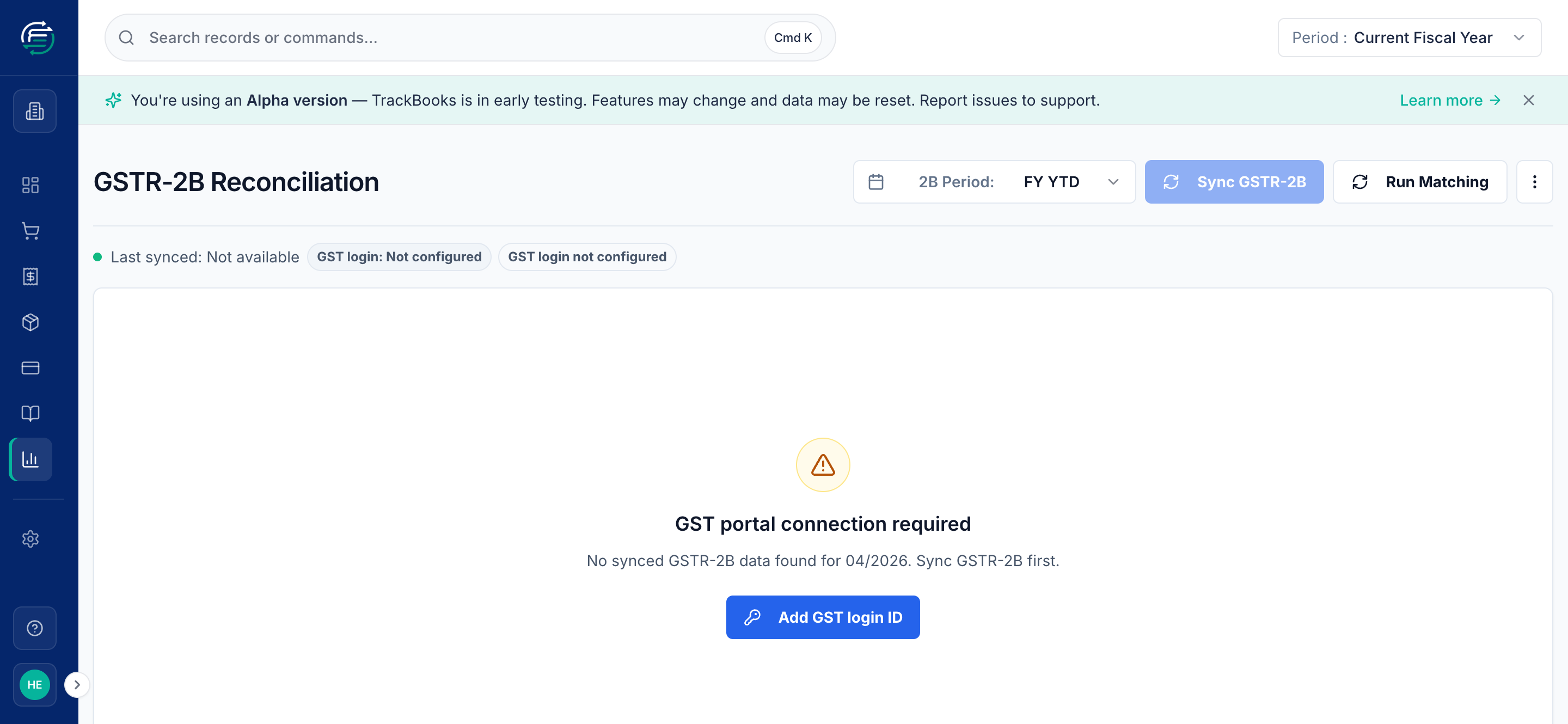
Once connected:
- Click Sync GSTR-2B to pull the latest statement from the portal (an OTP from the portal confirms the connection).
- Click Run Matching to compare the portal's ITC against your purchase bills. TrackBooks flags each line as matched, missing, or mismatched.
- Review and resolve mismatches — a bill you recorded that isn't in 2B yet, or vice versa.
TrackBooks connects on demand
The portal connection is used only when you sync. Your login isn't kept permanently logged in — you reconnect (with an OTP) when you next pull data.
Step 2 — Review and file GSTR-3B
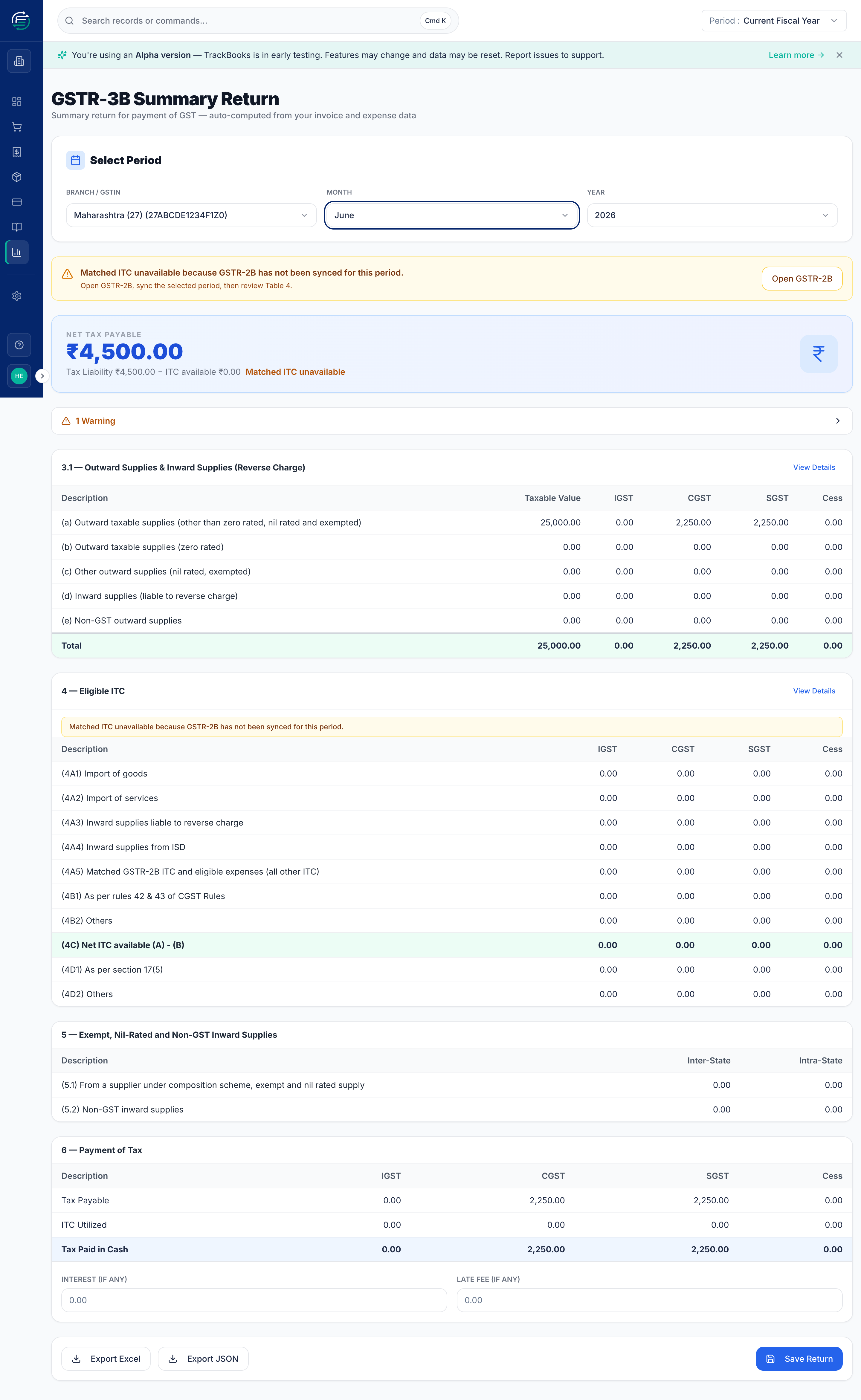
Go to GST → GSTR-3B and select the GSTIN and period. TrackBooks fills the return from your data:
- Table 3.1 — outward supplies and your output tax liability (from your sales invoices).
- Table 4 — eligible ITC, drawn from the matched GSTR-2B credit plus eligible expenses.
- Table 5 — exempt/nil/non-GST inward supplies.
- Table 6 — payment of tax, where Net Tax Payable = liability − ITC available.
Sync GSTR-2B before trusting Table 4
If you haven't synced GSTR-2B for the period, GSTR-3B shows "Matched ITC unavailable" and your ITC (and therefore net payable) will be understated. The screen links you straight to Open GSTR-2B to fix this.
Add any Interest or Late Fee, then Save Return, and Export JSON (for the portal) or Export Excel (for review) — just like GSTR-1.
Tips & common issues
Reconcile 2B before filing 3B
Always sync and match GSTR-2B first. Claiming more ITC in 3B than appears in 2B is a common cause of GST notices — the matching step protects you from that.
Only posted documents count
As with all returns, drafts and in-review invoices/bills are excluded until posted. Check the period and GSTIN if the figures look wrong.
Related guides
- File GSTR-1 — the outward-supplies return.
- Create & post a purchase bill — the source of your ITC.